Explore Bookstore
Browse the Bookstore
How to Access Your Follett Course/Inclusive Access Materials
You will be able to view your digital Course/Inclusive Access Materials via My Materials in D2L
Follow These Steps
Step 1. Start by Logging into D2L
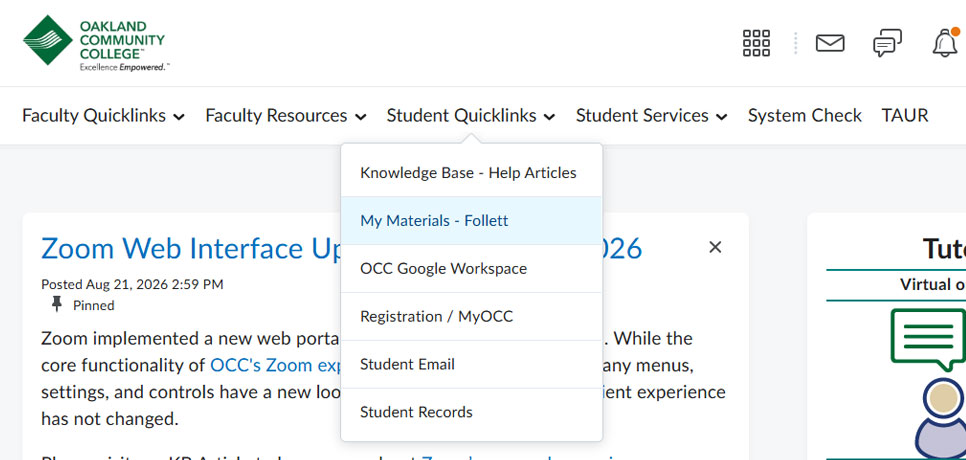
Step 2. Hover over over the drop down for Student Quick links and select My Materials-Follett.
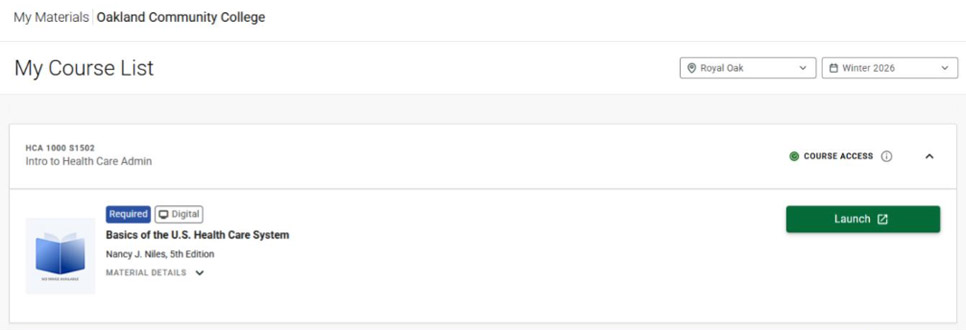
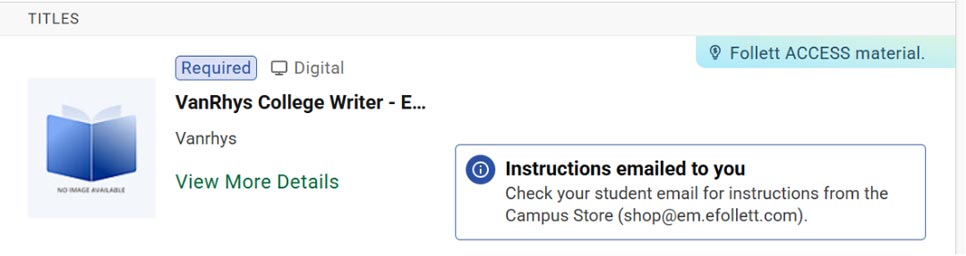
Step 3. Once in My Materials, locate your course. You will either see a green Launch button or a message to check your student email to get access.
Green Launch button:
Check email message:
Green Launch button:
Check email message:
NOTE: (If you have courses that are NOT part of the Course/Inclusive Access program, those will be visible here too, but will show a button that will take you to the bookstore site to view and/or purchase).
Follett Customer Support | (877) 612-2233
Contact Information and Hours
Auburn Hills Store - G Building
(serving both Auburn Hills and Highland Lakes)
Phone: (248) 232-4320
Jesstin Wasen - Store Team Lead
Orchard Ridge Store - J Building
Phone: (248) 522-3420
Karla Caul - Store Manager
Royal Oak Store - B Building
(serving both Royal Oak and Southfield)
Phone: (248) 246-2422
Amanda Leavy - Store Manager
Bookstore Hours
Friday: 9 a.m. – 2 p.m.
Saturday - Sunday: Closed